Insert pictures
Se aplica a: Word para Office 365 Word 2016 Word
2013 Word 2010 Word 2007 Word Starter 2010 Más...Menos

Esta página necesita la versión 11.2.0 de Flash o superior. |
1.
Do one of the following:
o Select Insert > Pictures
for a picture on your PC.
o Select Insert > Online
Pictures for a picture that's on the web.
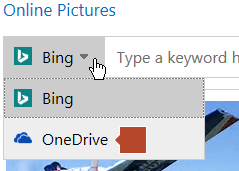
Tip: For a picture from your OneDrive, go
to the drop-down list at the top left, and switch from Bing to OneDrive.
2.
Select the picture you want, and then select Insert.
Resize or move pictures
·
To resize a picture, select the picture and drag a corner
handle.
·
To wrap text around a picture, select the picture, and
then select a wrapping option.

Tip: Pick something other than In Line
with Text, and you can move the picture around the page: select the picture
and drag it.