Write an equation or formula
Se aplica a:
Word para Office 365 Word 2016 Más... Menos
1. 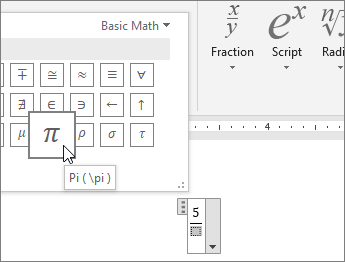 Press the Alt
and the = key at the same time, and then select a structure
from the gallery on the
Equation Tools - Design
tab.
Press the Alt
and the = key at the same time, and then select a structure
from the gallery on the
Equation Tools - Design
tab.
2. In
the structure, replace the placeholders
with your own values and with the available
symbols.
Tips: If you have
a touch screen device, try hand-writing your math.
1. Go to Draw >
Ink to Math.
2. Write your equation,
and choose Insert.
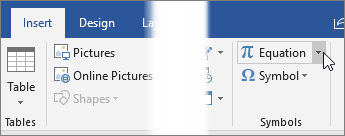
To insert common equations
like the Pythagorean theorem or the area
of a circle, go to the Insert tab, and then select
the arrow next to Equation.
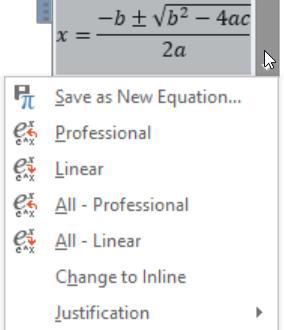 On any equation,
select Equation Options to switch between displays -- for the current
equation, or for all equations
in the document.
On any equation,
select Equation Options to switch between displays -- for the current
equation, or for all equations
in the document.
- Professional displays
the equation in a built-up format.
- Linear displays
the equation's source text UnicodeMath, LaTeX, or text, which
might be faster for you to edit than the Professional format.
|
|


Esta página necesita la versión 11.2.0 de Flash o superior. |